

Keyword research should guide an SEO strategy, but it often becomes a repetitive cycle of entering seed terms, exporting spreadsheets, checking search volumes and manually grouping hundreds of similar queries. Businesses can automate keyword research by using APIs and automation tools to discover keywords, collect metrics, remove duplicates, identify long-tail variations and create preliminary clusters. However, the most dependable workflows still require an SEO specialist to validate search intent, review live search results and decide which keywords belong on the same page.
When built correctly, keyword research automation does more than generate a large list of search terms. It transforms a focused set of seed keywords into an organized content plan containing relevant keyword clusters, recommended page formats, priorities and target URLs.
This guide presents a practical seven-step workflow for automating keyword research without losing strategic control. It explains how keyword data can be discovered, cleaned, classified, clustered and converted into a useful SEO content roadmap.
What Keyword Research Automation Actually Means
Automated keyword research uses software, APIs and predefined rules to complete repetitive research tasks at scale. It replaces individual keyword lookups with a connected process that moves data from discovery to clustering and content planning.
A typical automated SEO workflow may connect:
- Google Search Console for existing search queries
- Google Keyword Planner for keyword ideas and advertising data
- Google Trends for seasonality and growing topics
- An SEO data API such as DataForSEO
- Google Sheets or Airtable as a central keyword database
- n8n, Make or Zapier for workflow automation
- Live search results for intent verification and SERP-based clustering
Google’s guidance on helpful, people-first content emphasizes original value, clear expertise and a satisfying user experience. An automated keyword list is therefore only useful when it helps create content that genuinely satisfies the searcher’s needs.
What Should and Should Not Be Automated?
Not every keyword research decision carries the same level of risk. Repetitive data processing can usually be automated, while strategic decisions require human oversight.
| Suitable for automation | Requires human review |
|---|---|
| Pulling keyword suggestions | Confirming the dominant search intent |
| Collecting volume and CPC | Deciding whether a keyword supports business goals |
| Removing exact duplicates | Evaluating ambiguous or mixed-intent searches |
| Applying basic intent rules | Selecting the correct content format |
| Flagging SERP overlap | Approving final keyword clusters |
| Calculating priority scores | Assigning clusters to existing or new URLs |
| Scheduling data updates | Reviewing accuracy and topical relevance |
This separation prevents one of the biggest risks of automation: repeating an incorrect decision across thousands of keywords.
How to Automate Keyword Research in Seven Steps

A reliable keyword research automation process moves through seven connected stages. Each stage should produce a clear output before the next one begins.
Step 1: Define the Goal, Market and Intended Search Intent
Automation amplifies the quality of its inputs. A vague objective such as “find high-volume keywords” usually produces a broad list with little strategic or commercial value.
A stronger objective defines:
- The target product, service or subject
- The target country and language
- The intended audience
- The required content type
- The preferred search intent
- The conversion or business objective
For example, a company creating service pages may prioritize transactional searches. A publisher building an educational content hub will generally focus on informational queries.
The four standard categories provide a useful foundation for search intent classification:
- Informational: The searcher wants an explanation, guide or answer.
- Commercial: The searcher is comparing products, services or solutions.
- Transactional: The searcher is ready to purchase, book or request a quote.
- Navigational: The searcher wants a particular website, brand or login page.
Search intent should be defined before keyword expansion begins. Otherwise, informational and transactional queries may enter the same cluster and result in an unfocused page.
Step 2: Build a Focused Seed Keyword List
Seed keywords are the broad terms from which an automated system discovers more specific searches. They should come from real business and audience information rather than an AI-generated brainstorm alone.
Useful seed keyword sources include:
- Existing Google Search Console queries
- Product and service names
- Customer questions
- Sales-call language
- Internal website searches
- Competitor categories
- Customer support requests
- Related searches and autocomplete suggestions
A seed list for a marketing automation business might include “email automation,” “CRM workflows,” “lead nurturing” and “marketing automation software.”
Every seed should be stored with its parent topic, market, language and source. This allows each discovered keyword to be traced back to its original context.
A simple sheet can contain:
| Keyword | Seed topic | Market | Language | Source |
|---|---|---|---|---|
| Email automation software | Email automation | US | English | Service list |
| Automate lead nurturing | Lead nurturing | US | English | Customer question |
Traceability becomes particularly important when irrelevant suggestions need to be identified and removed later.
Step 3: Expand Keywords Through Multiple Sources
No single keyword research platform offers complete coverage. A stronger automated keyword discovery process combines several sources instead of relying on one database.
Keyword expansion should collect:
- Phrases containing the original seed
- Sibling and related topics
- Autocomplete suggestions
- Question-based searches
- People Also Ask queries
- Commercial modifiers
- Industry-specific variations
- Location-based keywords
- Alternative and comparison searches
A seed such as “keyword research” could generate natural variations including:
- Automated keyword research
- Keyword research automation tools
- How to automate keyword research
- Automated keyword clustering
- Keyword research workflow
- Keyword research with Google Sheets
- Keyword research using an API
- How to find long-tail keywords automatically
APIs can process hundreds of seed terms significantly faster than manual tool interfaces. An automation platform can send each seed to a keyword data provider and write the returned suggestions directly into a central sheet.
Step 4: Enrich, Clean and Standardize the Data
Raw keyword suggestions are rarely ready for an SEO strategy. They commonly contain duplicates, spelling variations, irrelevant brand names and phrases that do not support the project’s objectives.
The cleaning stage should:
- Convert capitalization into a consistent format.
- Remove unnecessary spaces and characters.
- Deduplicate exact matches.
- Flag close variations without automatically deleting them.
- Remove irrelevant or prohibited queries.
- Attach search volume, CPC, difficulty and trend data.
- Record the selected market and metric date.
- Preserve the original search phrase in a separate column.
Close keyword variations should not be deleted too early. Different wording may reveal useful search behavior even when several queries eventually belong on the same page.
Step 5: Classify Search Intent Against the Live SERP
Rule-based intent classification can identify obvious keyword modifiers:
- “How,” “guide” and “what is” generally indicate informational intent.
- “Best,” “review,” “versus” and “alternatives” usually indicate commercial research.
- “Buy,” “pricing,” “service” and “near me” often indicate transactional intent.
- Brand names combined with “login” or “dashboard” indicate navigational intent.
These rules are useful for an initial classification, but words alone cannot reliably determine intent.
The live search results provide stronger evidence. If Google primarily ranks tutorials, videos and educational articles, the query is likely informational. If service pages, ecommerce categories and product pages dominate the results, a transactional page may be more appropriate.
The automated keyword research workflow should record:
- Dominant page format
- Dominant search intent
- SERP features
- Recurring topics and entities
- Top-ranking URLs
- Whether the results are local, informational or commercial
A query may occasionally produce a mixed SERP containing articles, product pages, videos and forum discussions. These keywords should be flagged for manual review instead of being forced into an automatic category.
Step 6: Group Keywords Using SERP-Based Clustering
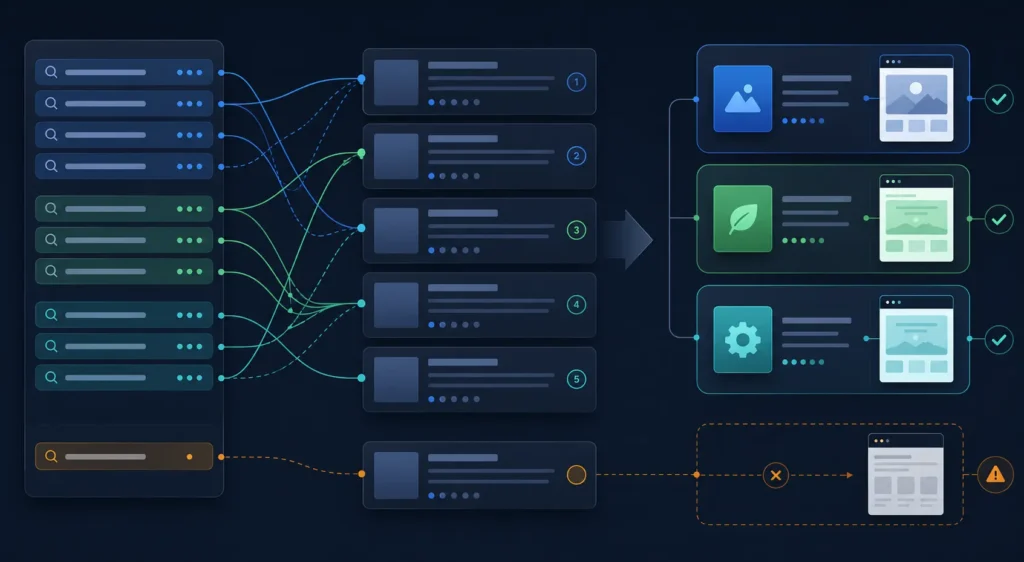
Keyword clustering determines which queries should be targeted on the same page. This stage is essential for creating a clean website structure and preventing keyword cannibalization.
SERP-based keyword clustering compares the top-ranking pages for each keyword. When two queries share a meaningful percentage of ranking URLs, they may belong in one page-level cluster.
For example, the following terms could form one cluster if their search results substantially overlap:
- How to automate keyword research
- Automated keyword research workflow
- Keyword research automation process
- Automate keyword discovery and clustering
However, “best keyword research automation tools” may require a separate commercial comparison page if its search results are dominated by software roundups and product comparisons.
Every approved keyword cluster should contain:
- A primary keyword
- Natural secondary keyword variations
- Dominant search intent
- Recommended page format
- Supporting questions
- Proposed URL
- Existing-page or new-page status
A human SEO specialist should review borderline clusters before the final content map is approved.
Step 7: Score Opportunities and Build the Content Plan
A large collection of keywords becomes useful only after prioritization. Without a scoring process, content teams may spend time on high-volume queries that offer little business value or realistic ranking potential.
A practical scoring model can evaluate:
| Factor | Suggested importance |
|---|---|
| Business value | 35% |
| Search demand | 25% |
| Ranking feasibility | 20% |
| Conversion intent | 20% |
The exact weighting should reflect the type of website. A local service business may place greater importance on commercial intent and business value, while an informational publisher may prioritize search demand and topical relevance.
High-priority clusters should then be mapped to:
- Existing pages requiring optimization
- New service or category pages
- Pillar guides
- Supporting blog articles
- Comparison pages
- FAQ sections
- Location pages
Before a new URL is recommended, the system should check whether an existing page already targets the same search intent. This additional step helps prevent unnecessary page creation and internal competition.
The final output should be a build-ready content plan rather than another keyword export.
A Practical Automated Keyword Research Stack
A small SEO team does not need numerous disconnected platforms. A practical starter stack may include:
- Google Search Console: Existing clicks, impressions, positions and query opportunities
- Google Sheets: Central keyword repository
- DataForSEO or another keyword API: Keyword suggestions and related metrics
- n8n or Make: API calls, scheduling and data movement
- Live SERP data: Intent validation and page-level clustering
- A human reviewer: Final strategic and quality control
The workflow can begin when a new seed term is added to the central sheet. The automation retrieves related keywords, adds the available metrics, applies preliminary intent labels and sends uncertain records into a manual review queue.
Approved keywords can then move into the clustering and prioritization stages. Scheduled workflows may update important data monthly or quarterly, depending on how quickly the industry changes.
Example: Turning One Seed Into a Content Plan
Consider the seed keyword “marketing automation.”
An automated system might initially collect 300 related searches. After deduplication, relevance filtering and quality checks, 190 useful terms may remain. Search-intent classification and SERP comparison could divide those keywords into clusters such as:
- What is marketing automation?
- Best marketing automation software
- Marketing automation for small businesses
- Marketing automation pricing
- Email automation workflows
- Marketing automation agency services
Each group represents a different search requirement.
Publishing one oversized article that targets all six clusters would create an unfocused experience. Publishing 190 individual pages would create duplication, thin content and keyword cannibalization.
The correct outcome is a smaller group of distinct pages, with each page responsible for one dominant intent and supported by closely related keyword variations.
This demonstrates an important principle: keyword research automation should reduce unnecessary page creation rather than encourage it.
Common Keyword Research Automation Mistakes
Depending on One Keyword Source
Every platform has data gaps and estimation differences. Important terms should be compared across first-party data, keyword databases, Google Trends and live search results.
Prioritizing Volume Over Relevance
A high-volume keyword is not automatically valuable. Business relevance, conversion potential and ranking feasibility should influence the final priority.
Clustering Only by Similar Words
Word similarity can mistakenly place informational and transactional searches together. SERP overlap provides a more reliable signal for page-level grouping.
Removing Human Review
Automated search-intent labels can misinterpret short or ambiguous queries. High-value and uncertain clusters should always receive manual verification.
Creating a New Page for Every Keyword Variation
Closely related keywords often belong on one comprehensive page. Excessive page creation can increase cannibalization and spread authority across several weak URLs.
Treating Search Volume as an Exact Figure
Search-volume tools provide estimates. These figures should be evaluated alongside existing impressions, trends, business relevance and real search results.
Setting Up the Workflow and Forgetting It
Search behavior, competitor pages and SERP formats change. Important keyword groups should be reviewed and refreshed periodically.
Quality-Control Checklist for Automated Keyword Research
Before an automated keyword map is approved, an SEO specialist should confirm that:
- Every keyword belongs to a relevant seed topic.
- Every cluster has one dominant search intent.
- Mixed-intent queries have been manually reviewed.
- Live SERP overlap supports the final grouping.
- Every approved cluster has one proposed URL.
- Existing pages were checked before new URLs were recommended.
- Search-volume figures include a date and target market.
- High-priority keywords support measurable business objectives.
- Irrelevant brands, jobs and unrelated download terms were removed.
- The final plan identifies both page format and funnel stage.
- No two planned pages are competing for the same core intent.
- Important commercial decisions have not been left entirely to automation.
Balance Automation With Human SEO Judgment
The purpose of learning how to automate keyword research is not to remove strategic thinking. It is to eliminate repetitive work so that more time can be spent evaluating search intent, identifying realistic opportunities and creating pages that satisfy genuine user needs.
A dependable system begins with focused seed keywords, combines several data sources, validates intent against live search results and groups keywords at the page level. It then converts the strongest opportunities into an organized content roadmap with defined URLs and page formats.
Automation provides the speed and scale. Human judgment protects accuracy, relevance and trust. When both elements work together, keyword research becomes more than a spreadsheet & it becomes a repeatable foundation for stronger content, clearer website architecture and sustainable organic growth.
Frequently Asked Questions
Can Keyword Research Be Fully Automated?
Keyword discovery, data collection, cleaning and preliminary clustering can be automated. Final search-intent decisions, page selection, URL mapping and quality review should remain under human control.
Can ChatGPT Automate Keyword Research?
ChatGPT can help generate seed ideas, recognize modifiers, classify search intent and summarize SERP patterns. It should not be treated as a dependable source of search volume, keyword difficulty or current ranking data unless it is connected to live SEO and SERP APIs.
What Is the Best Tool for Automated Keyword Research?
There is no universal best tool. The right combination depends on the project’s size, budget, target markets and technical resources. Search Console, a keyword data API, a spreadsheet and an automation platform provide a flexible starting point.
How Often Should Automated Keyword Research Be Updated?
Quarterly updates are suitable for many stable industries. Fast-moving, seasonal and news-driven markets may require monthly refreshes. Important keyword clusters should also be reviewed whenever their rankings or search intent change significantly.
Does Automated Keyword Research Prevent Cannibalization?
Automation can help identify potential cannibalization when keywords are clustered by shared search results and mapped to individual URLs. It cannot prevent the problem if content teams publish new pages without reviewing existing content and keyword ownership.
Is Keyword Research Automation Suitable for Local SEO?
Yes. Local businesses can use automation to expand service keywords across locations, collect local modifiers and identify separate intent patterns. Each location combination should still be verified because not every generated city-and-service variation has genuine search demand or deserves an individual page.