
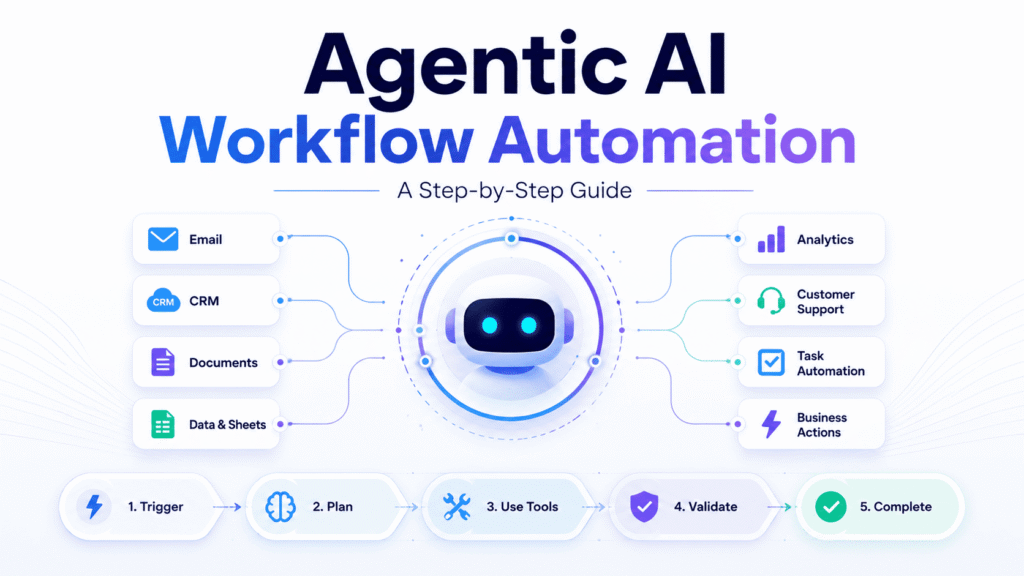
Agentic AI workflow automation uses autonomous AI agents to understand a goal, plan the required steps, interact with business tools, and complete a process with limited human involvement. Unlike traditional automation, an AI agent can interpret changing inputs, choose an appropriate action, and escalate uncertain situations.
A business should begin with one frequent, low-risk workflow, restrict the agent’s access and test its decisions against real historical cases. Human approval should remain in place for financial, legal, security-related, or customer-sensitive actions until the system demonstrates reliable performance.
Why Businesses Are Moving Beyond Traditional Automation
Traditional workflow automation works effectively when all inputs are predictable. A completed form can create a CRM record, a payment can generate an invoice, and a new support request can trigger a confirmation email.
The difficulty begins when a process requires judgment.
A customer may report several problems in a single message. A sales lead may appear qualified but fail one important requirement. An invoice may match a purchase order in value but contain incorrect supplier information.
Rule-based systems struggle with these situations because every possible condition must be defined in advance. Agentic AI adds a reasoning layer that can interpret available information before deciding what to do next.
Instead of simply passing information from one application to another, an AI agent can review the situation, collect relevant context, select tools, complete approved actions, and evaluate whether the desired result has been achieved.
What Is an Agentic AI Workflow?
An agentic workflow is a multi-step process managed by an AI agent working toward a clearly defined goal. The agent does not rely entirely on one fixed sequence. It can determine which steps, tools, and information are required for an individual case.
A practical agentic system normally includes the following components:
- Instructions: The goal, rules, and operating boundaries are given to the agent.
- Reasoning model: The AI system that interprets information and selects actions.
- Tools: Email platforms, CRMs, databases, APIs, and other business applications.
- Context: Customer, company, or workflow information needed to complete the task.
- Memory: Relevant information retained during or between workflow stages.
- Guardrails: Restrictions that determine which actions are permitted.
- Monitoring: Records showing what the agent decided and which actions it performed.
An agent should therefore be treated as a controlled business process rather than a chatbot connected to several applications.
Agentic AI vs. Traditional Workflow Automation
Traditional and agentic automation are useful for different types of work.
| Area | Traditional automation | Agentic AI workflow |
| Decision process | Follows predefined rules | Uses context-based reasoning |
| Input handling | Best for structured inputs | Can interpret changing inputs |
| Workflow path | Fixed in advance | Can adjust between steps |
| Content creation | Uses templates | Produces contextual content |
| Error handling | Stops or enters a predefined branch | Can retry, adapt or escalate |
| Best use | Stable and predictable tasks | Multi-step processes requiring judgment |
Agentic AI should not replace every existing automation. A fixed workflow remains the more reliable and affordable option when every decision can be expressed through clear rules.
An agent becomes useful when a process contains natural language, unstructured documents, changing circumstances, or exceptions that are difficult to predict.
How Agentic Workflow Automation Works
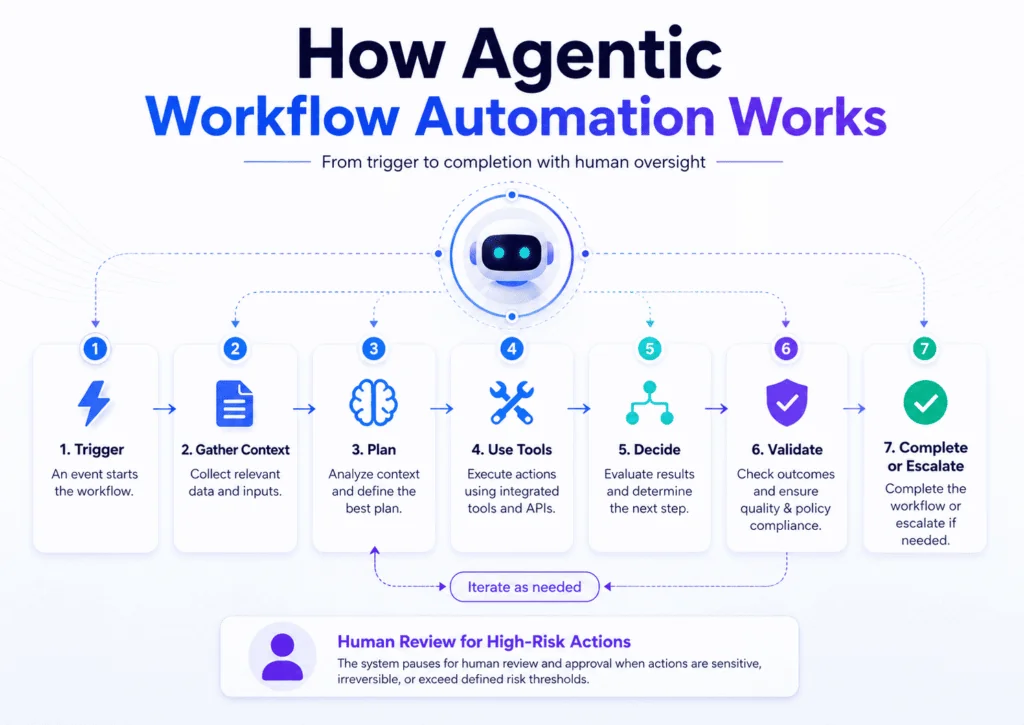
Agentic workflow automation generally follows a controlled cycle consisting of a trigger, context collection, planning, tool use, validation, and completion.
The following support-ticket example shows how each stage works in practice.
1. A Trigger Starts the Workflow
A trigger is the event that activates the agent. It may be an incoming email, a completed form, a database update, a scheduled task, or a message received through a customer-support platform.
For example, a customer sends an email stating that one item from an order is missing.
2. The Agent Collects Relevant Context
The agent identifies the information required to understand the request. It may retrieve the customer profile, order history, delivery status, inventory records, and company policies.
In the missing-item example, the agent retrieves the order and checks which products were purchased and dispatched.
3. The Agent Creates a Plan
After collecting the context, the agent determines what must be checked before an action can be taken.
The plan may include:
- Confirming the customer’s identity
- Checking the shipment status
- Reviewing delivery evidence
- Verifying available replacement stock
- Reading the company’s replacement policy
The workflow path is not completely fixed. The agent selects the relevant checks based on the information contained in the request.
4. The Agent Uses Connected Tools
The agent interacts with approved systems to gather information or complete specific actions.
It may search an order-management platform, check a delivery provider, read inventory records, or prepare an update in the CRM.
Access should be limited. A customer-support agent may need permission to read order information without receiving unrestricted access to financial or administrative settings.
5. The Agent Makes a Controlled Decision
The agent compares the available evidence with its instructions and company policies.
If shipment records confirm that an item was not dispatched and the order value is below the approved limit, it may recommend a replacement. If the evidence is incomplete or contradictory, it should escalate the case.
6. The Result Is Validated
Before completing the action, the workflow should verify that the decision follows the relevant policy.
Validation may include:
- Confirming the replacement item is available
- Checking that the delivery address is correct
- Ensuring the value is below the approval threshold
- Confirming that a similar request has not already been processed
This stage reduces duplicated actions and avoidable errors.
7. The Workflow Is Completed or Escalated
When all conditions are satisfied, the agent may prepare the replacement order, update the CRM, and notify the customer.
When the case falls outside its authority, it should create a concise summary and transfer the request to a human employee. The employee can then review a prepared case instead of investigating it from the beginning.
Every workflow should have a clear stopping condition. Without one, an agent may repeat actions, continue using tools unnecessarily, or operate beyond its intended responsibility.
Which Workflows Should Be Automated First?
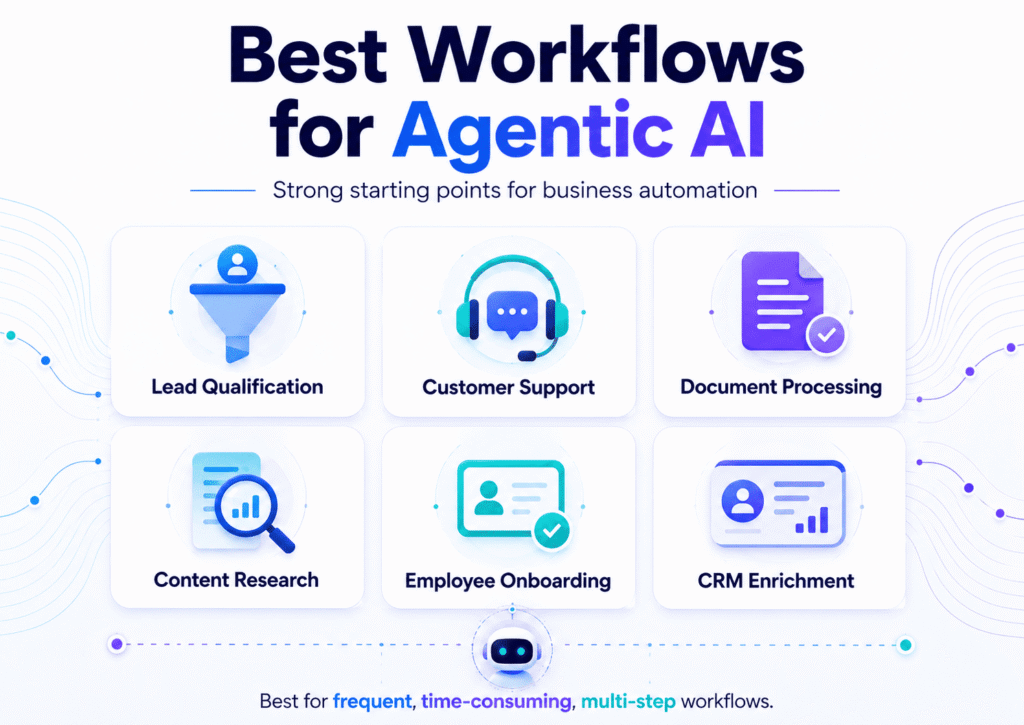
The best candidates are high-frequency processes that consume meaningful staff time, follow recognizable patterns, and carry manageable consequences when a case requires correction.
Lead Qualification and Follow-Up
An AI agent can collect company information, compare a lead with ideal customer criteria, assign a preliminary score, and prepare a personalized follow-up message.
It can also update the CRM and schedule the next action. Important prospects or unusual cases can remain subject to sales-team review.
Customer Support Triage
An agent can classify customer requests, retrieve account information, recommend a solution, and prepare a response.
Routine questions may be completed automatically. Refunds, cancellations, complaints, and sensitive account changes should follow stricter approval rules.
Document and Invoice Processing
Agentic workflows can extract information from invoices, compare documents with purchase orders, and identify missing or inconsistent details.
Clear matches can move to the next stage automatically, while unusual amounts, duplicate invoice numbers, or supplier discrepancies can be flagged for review.
Content Research and Preparation
A research agent can gather information from approved sources, organize findings, identify competing content, and prepare a structured brief.
A qualified editor should verify factual claims, statistics, and recommendations before publication. The agent supports the research process rather than replacing editorial responsibility.
Employee Onboarding
An agent can coordinate onboarding tasks across HR, IT, and management systems.
It may prepare account requests, assign training materials, send reminders, and track incomplete requirements. Access to sensitive employee data should remain restricted according to role.
CRM Data Enrichment and Maintenance
Customer relationship management systems frequently contain incomplete, outdated, or inconsistent information. An agentic workflow can review records and identify gaps without requiring employees to inspect each contact manually.
The agent may:
- Fill in missing company information from approved sources
- Standardize job titles and company names
- Identify probable duplicate records
- Flag outdated email addresses
- Detect likely job changes
- Categorize accounts by industry or company size
- Create a review list before important information is overwritten
CRM enrichment is a suitable agentic use case because the process combines repetitive research with limited judgment. However, the agent should not automatically replace verified customer data when confidence is low.
How to Evaluate a Workflow for Agentic Automation
Before building an agent, an organization should evaluate whether the selected process is suitable.
Important questions include:
- How frequently does the workflow occur?
- How much time does each case require?
- Are the inputs reasonably consistent?
- How many systems are involved?
- Does the process require moderate judgment?
- What would happen if the agent made a mistake?
- Are verified historical cases available for testing?
A process that occurs several times each day, requires meaningful manual effort, and has correct historical examples is usually a stronger candidate than a rare process involving severe financial or legal risk.
Should a Business Use Code, Low-Code or No-Code?
The best implementation approach depends on the complexity of the workflow, available technical skills, integration requirements and level of control required.
Custom-Code Agentic Workflows
A custom-code approach gives developers the greatest control over agent behaviour, integrations, security and infrastructure.
It is generally suitable for:
- Proprietary internal systems
- Complex business logic
- Strict security or compliance requirements
- High workflow volumes
- Organizations with experienced development teams
The main disadvantage is that custom systems require more time to build, test, monitor and maintain. The organization is also responsible for infrastructure, authentication, logging, and model-cost management.
Low-Code Agentic Workflows
Low-code platforms provide visual workflow builders while still allowing scripts, APIs, and custom integrations.
They are suitable for operations teams that need more flexibility than a no-code platform offers but do not want to build the entire system from scratch.
Low-code tools can shorten development time, although technical support may still be required for authentication, advanced logic, and unusual integrations.
No-Code Agentic Workflows
No-code platforms allow a workflow to be configured through visual steps or natural-language instructions.
They work best for:
- Standard sales and marketing processes
- Customer-support workflows
- Document handling
- Content research
- Internal notifications
- Small and medium-sized businesses without development teams
No-code tools usually provide the fastest route to a working prototype. Their limitations may include less control over infrastructure, model selection, advanced security settings, and highly specialized logic.
| Approach | Best suited for | Main advantage | Main limitation |
| Custom code | Complex systems and strict requirements | Maximum control | Higher development and maintenance effort |
| Low-code | Teams needing speed and flexibility | Balance of control and convenience | Some technical knowledge may be required |
| No-code | Standard workflows and non-technical teams | Fastest setup | Less control over unusual requirements |
A business should not automatically choose the most complex option. The right approach is the simplest one that meets the workflow’s operational, security, and performance requirements.
Step-by-Step: Building the First Agentic Workflow
1. Define One Measurable Outcome
The project should begin with a business result rather than a particular AI tool.
“Reduce first-response time for support requests” is more useful than “implement an AI agent.”
The workflow definition should identify:
- The trigger
- Required inputs
- Decisions the agent may make
- Tools it may access
- Permitted actions
- Expected output
- Escalation conditions
2. Map the Existing Process
Every manual step should be documented before automation begins.
This often reveals duplicated work, unclear responsibilities, and unnecessary approvals. Automating an inefficient process only allows the same problems to occur more quickly.
3. Restrict Tool Access
The agent should receive only the permissions needed to complete the selected workflow.
Read-only access should be used where possible during testing. Sensitive actions should require additional confirmation or human approval.
4. Build the Smallest Useful Version
The first version should perform one valuable part of the process.
A lead-management agent might initially classify leads without contacting them. Email drafting, CRM updates, and follow-up scheduling can be added after the classifications prove reliable.
5. Test With Historical Cases
The agent should be tested against real completed cases where the correct outcome is already known.
Testing should include:
- Normal cases
- Incomplete information
- Conflicting records
- Failed integrations
- Unusual requests
- Cases requiring escalation
6. Introduce Human Review
During the early deployment stage, employees should approve important actions.
Additional autonomy should be granted only after the system demonstrates reliable performance across both normal cases and exceptions.
Security, Governance, and Human Oversight
Security controls should be defined before an agent receives access to business systems.
The organization should specify:
- Which records the agent may read
- Which fields it may update
- Which actions require approval
- What transaction limits apply
- How long is workflow data retained
- Who reviews errors and unusual activity
- How can the agent be paused immediately
A production agentic workflow should also maintain records of its decisions and tool actions. These logs make it easier to investigate errors, improve instructions, and demonstrate that important processes are being monitored.
Human review is especially important for financial transactions, legal decisions, healthcare information, recruitment decisions, and sensitive customer data.
How Success Should Be Measured
The number of completed tasks does not prove that the workflow is creating value.
Performance should be measured through:
- Automation rate: The percentage of cases completed without intervention
- Accuracy rate: The percentage of cases completed correctly
- Escalation quality: Whether uncertain cases reach the appropriate employee
- Time saved: The manual hours recovered
- Cost per case: Platform, model, and review costs combined
- Business outcome: Faster responses, fewer errors or improved conversions
The results should be reviewed regularly. A workflow may require updates when company policies, external APIs, connected applications, or customer behaviour change.
Common Agentic Automation Mistakes
One common mistake is attempting to automate an entire department at once. A smaller workflow is easier to test, monitor, and improve.
Other avoidable problems include:
- Automating an unclear process
- Giving the agent unnecessary access
- Testing only ideal cases
- Removing human review too early
- Using poor-quality internal data
- Failing to define escalation rules
- Building multiple agents when one controlled agent is sufficient
- Treating the workflow as a one-time project
Every deployed agent should have a clearly identified owner responsible for monitoring its performance and updating its instructions.
Start With One Controlled Agentic Workflow
Understanding how to use agentic AI for workflow automation is not about giving artificial intelligence unrestricted control. It is about assigning a carefully defined responsibility to a system capable of interpreting information, selecting tools, and completing approved actions.
The strongest implementations begin with a single valuable process, use limited permissions, test against real-world cases, and retain human authority over sensitive decisions. When reasoning, integrations, guardrails and measurement work together, agentic workflows can improve business processes without sacrificing accountability or control.
If your business wants to build secure, reliable agentic AI workflows, CamzioTech can help you design and implement AI automation solutions tailored to your processes.
Frequently Asked Questions
Does agentic AI require a developer?
Not always. No-code and low-code tools can support many standard business workflows. Custom development is more appropriate when the process involves proprietary systems, unusual requirements, or strict compliance controls.
What is the best first agentic workflow?
Lead qualification, support triage, CRM enrichment, content research, and document processing are practical starting points because they are frequent, measurable, and suitable for human review.
Can an agentic workflow operate without human supervision?
It can autonomously complete approved low-risk cases. High-impact actions should continue to use transaction limits, confidence thresholds, and escalation rules.
How is an AI agent different from a chatbot?
A chatbot primarily generates responses. An AI agent can manage a multi-step process, retrieve information, use connected tools, complete approved actions, and determine whether the assigned goal has been achieved.
Can agentic AI work with existing business tools?
Yes. Agentic AI workflows can connect with CRMs, email platforms, spreadsheets, support tools, databases, project management software and APIs. The important part is giving the agent controlled access only to the tools and data required for the selected workflow.